
Wireless M2M smooth and connected
|


|
|
Wireless M2M smooth and connected
|
|
Board Switches
Dev Kit Cables
What's Next?
Connect PC to dev kit device:
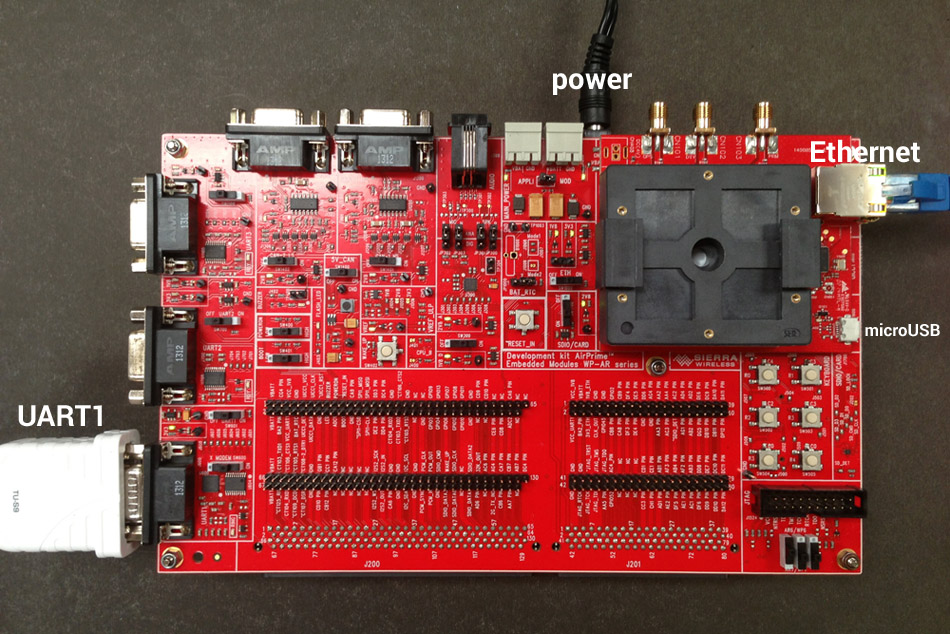
Photo of a Legato dev kit board with power, Ethernet, micro-USB, and UART1 connections:
Dev kit board required switch settings:
Cables used to connect the Legato development kit board:
UART1
Serial to USB cable to the host PC. Provides serial console to embedded Linux. Requires Minicom or similar tool to access device.
UART port settings:
USB
Micro-USB to USB cable to the host PC. Provides access to fastboot, CDC-ECM, CDC-ACM (AT commands), USB Audio, and Ethernet over USB (through an adapter). Requires ECM to be setup. Disabled by default.
Ethernet
Ethernet cable for direct network connection to obtain dynamic IP address for the device using DHCP.
Assemble Device Dev Kit
Install Packages
Copyright (C) Sierra Wireless, Inc. 2014. All rights reserved. Use of this work is subject to license.
 Sierra Wireless 2014
-
Generated by Doxygen 1.7.6.1
Sierra Wireless 2014
-
Generated by Doxygen 1.7.6.1