
Add Client/Server
After you've created your client and server programs with their interfaces bound to each other, this is how you create the app.
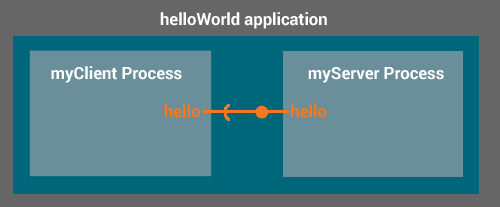
Create an app definition file called helloWorld.adef like this:
$ gedit helloWorld.adef
executables:
{
    myServer = ( greetServer )
    myClient = ( greetClient )
}

processes:
{
    run:
    {
        (myServer)
        (myClient)
    }
}

bindings:
{
    myClient.greetClient.hello -> myServer.greetServer.hello
}
This defines two executable programs called myServer (containing the greetServer component) and myClient (containing the greetClient component).
It then starts one instance of myServer and one instance of myClient, and binds myClient.greetClient.hello to myServer.greetServer.hello.
Then run mkapp to build everything and package it up into an app.
$ mkapp helloWorld.adef -t wp85
You'll now have a file called "helloWorld.wp85" that contains your app.
You can install and run it using update, see Install App to Target for details.
Copyright (C) Sierra Wireless Inc. Use of this work is subject to license.